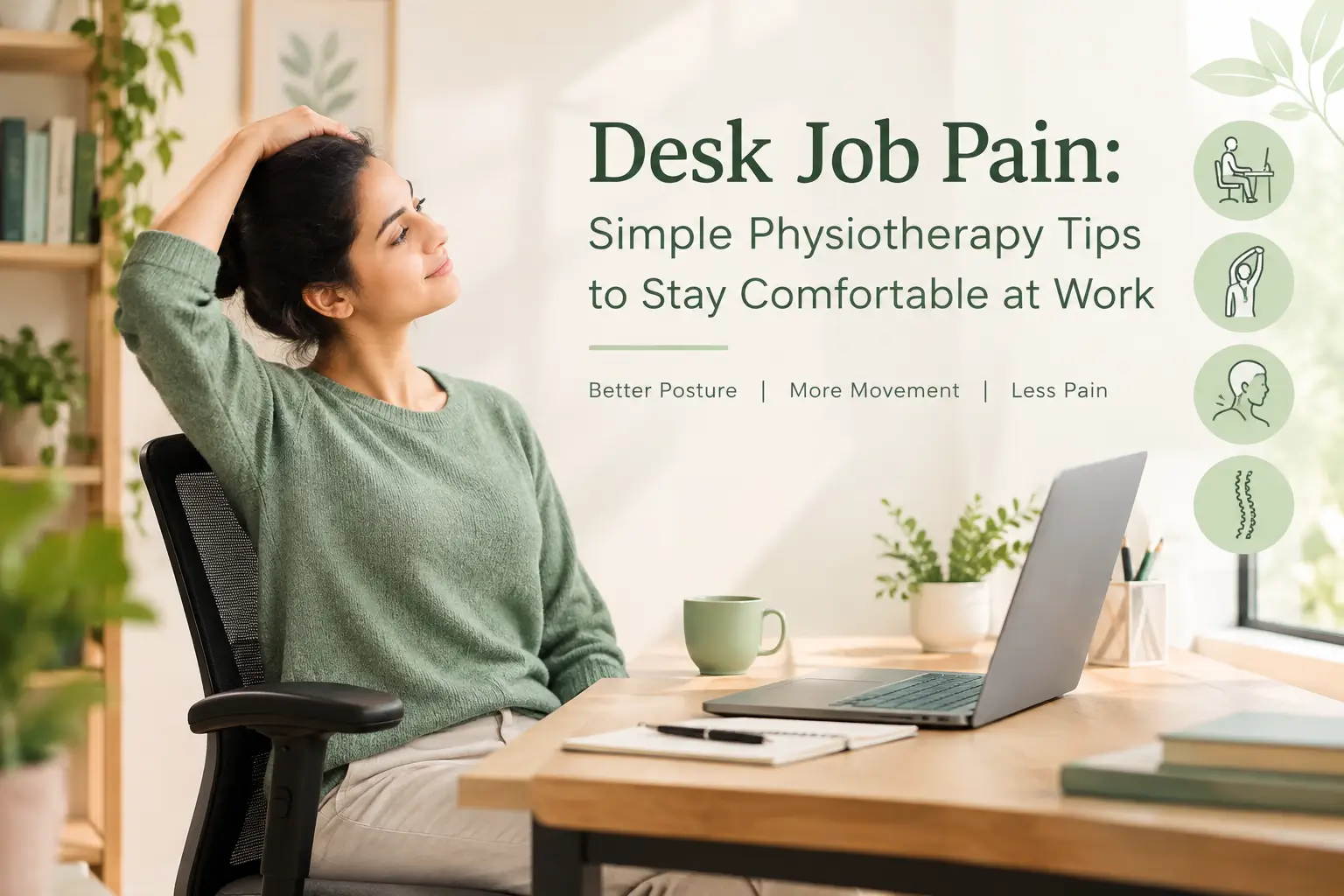
How to Make Your Desk Job Healthier: 8 Simple Tips
Do you spend most of your working day sitting at a desk? If you regularly experience neck pain, shoulder stiffness, back discomfort, wrist and hand discomfort your work routine may be contributing to these symptoms. Fortunately, a healthier desk job can start with a few simple changes to the way you sit, move, work, and take care of your body throughout the day. Although spending long hours at a computer can leave you feeling stiff, tired, or uncomfortable, small adjustments can make your workday much more body-friendly.
However, desk work itself is not necessarily harmful. Instead, the way you work can make a difference. For example, staying in one position for extended periods, using an uncomfortable workstation setup, and getting too little movement throughout the day may gradually contribute to muscle and joint discomfort. Therefore, by making small changes to your workspace and daily routine, you can create a more comfortable and healthier working environment.
You don’t need to completely change your working routine.
Small adjustments to your workstation, combined with regular movement and physical activity, can make your working day more comfortable.
Common Problems Associated With Long Hours at a Desk
People who spend many hours working at a computer may experience:
- Neck and shoulder discomfort
- Upper or lower back pain
- Muscle stiffness
- Tension-related headaches
- Wrist or hand discomfort
- Hip and leg stiffness
- Muscle fatigue or weakness
You may notice that these symptoms become more noticeable toward the end of your working day or after several hours of continuous computer work.
It is also important to remember that pain is influenced by many factors. Your workstation and sitting habits may contribute to discomfort, but stress, sleep, physical activity, previous injuries, workload, and other individual factors can also play a role.
Most importantly, change your position regularly. Your body is designed to move. Rather than searching for one perfect sitting position, try to avoid staying in the same position for prolonged periods.
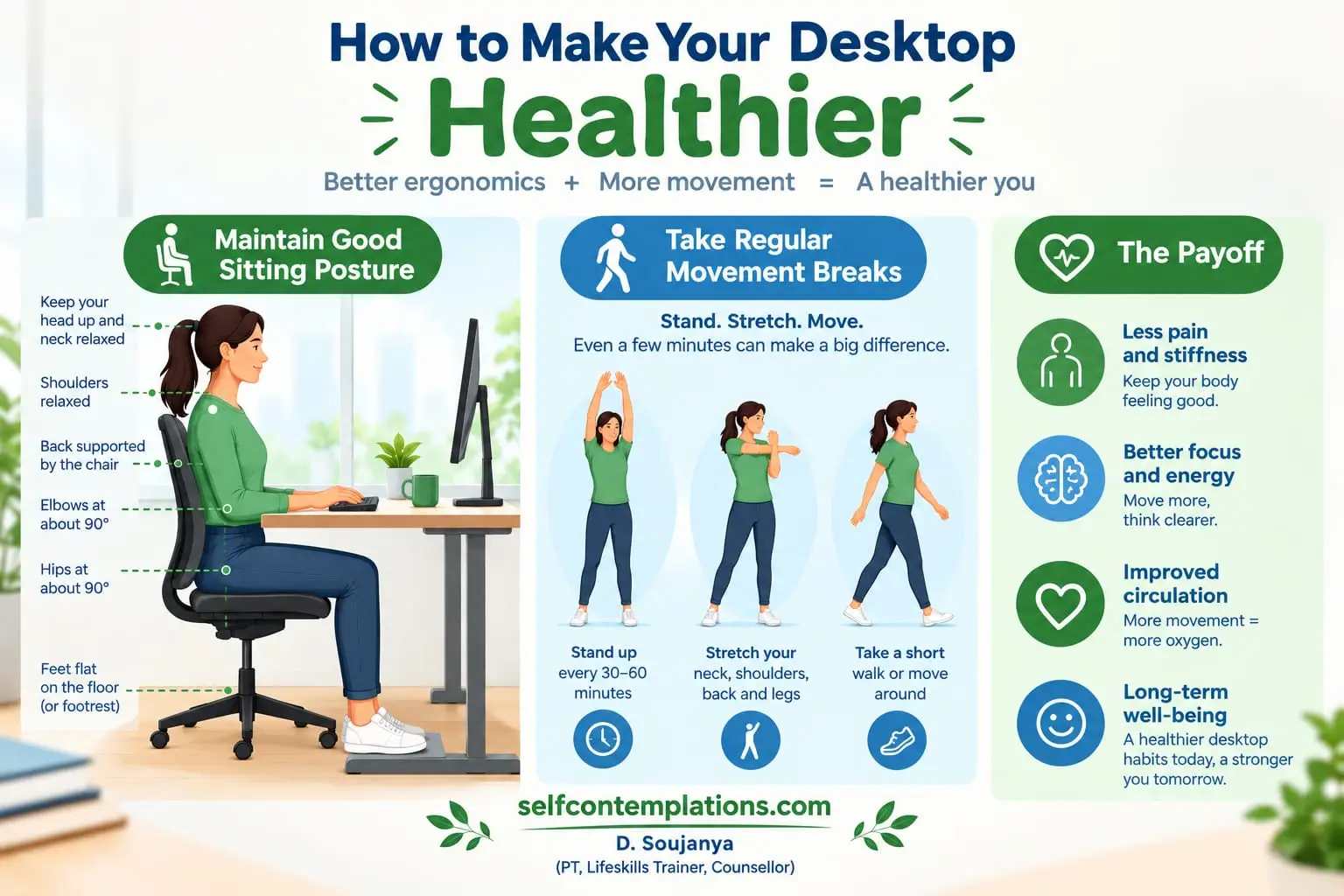
1. Improve Your Ergonomics
Ergonomics is essentially about making your work environment fit your body and the tasks you perform. Start by looking at your chair, desk, screen, keyboard, and mouse.
Chair Height: Your feet should rest flat on the floor, with knees at a 90-degree angle.
Monitor Position: Keep your screen at eye level to avoid neck strain.
Keyboard and Mouse: Place them at elbow height, with your arms forming a 90-degree angle.
Sometimes small changes can make a noticeable difference.
For example, Laptop stand + separate keyboard + separate mouse This allows you to adjust the screen and your hands independently.
Think of ergonomics as reducing unnecessary strain rather than trying to achieve a “perfect” position.
2. Take Regular Movement Breaks
One of the simplest things you can do during a long workday is to interrupt prolonged sitting.
The Rule is to stand up or move every 30 minutes, even if it’s just for a minute or two. Stand while making a phone call. Walk to refill your water. Take a short walk after completing a task. Get up and move around between meetings. Simple stretches like shoulder rolls or neck tilts can ease muscle tension. Even short periods of movement can help break up long stretches of uninterrupted sitting.
If you tend to become absorbed in your work, use a timer or calendar reminder as a cue to move.
Don’t wait until your back starts hurting before you move. Make movement part of the routine.
3. Maintain Good Sitting Posture
Your sitting position can influence how comfortable you feel throughout the day. Rather than sitting rigidly upright, aim for a relaxed and supported position. Here’s how to sit:
Sit all the way back in your chair to use the lumbar support, allow your shoulders to remain relaxed, and position your feet flat. Avoid crossing your legs, constantly leaning toward your screen or sitting at the edge of your chair for hours.
But remember that even a good sitting position shouldn’t be maintained indefinitely.
Good posture isn’t about freezing your body in one position. It’s about having a comfortable position and changing it regularly.
4. Stretch Daily
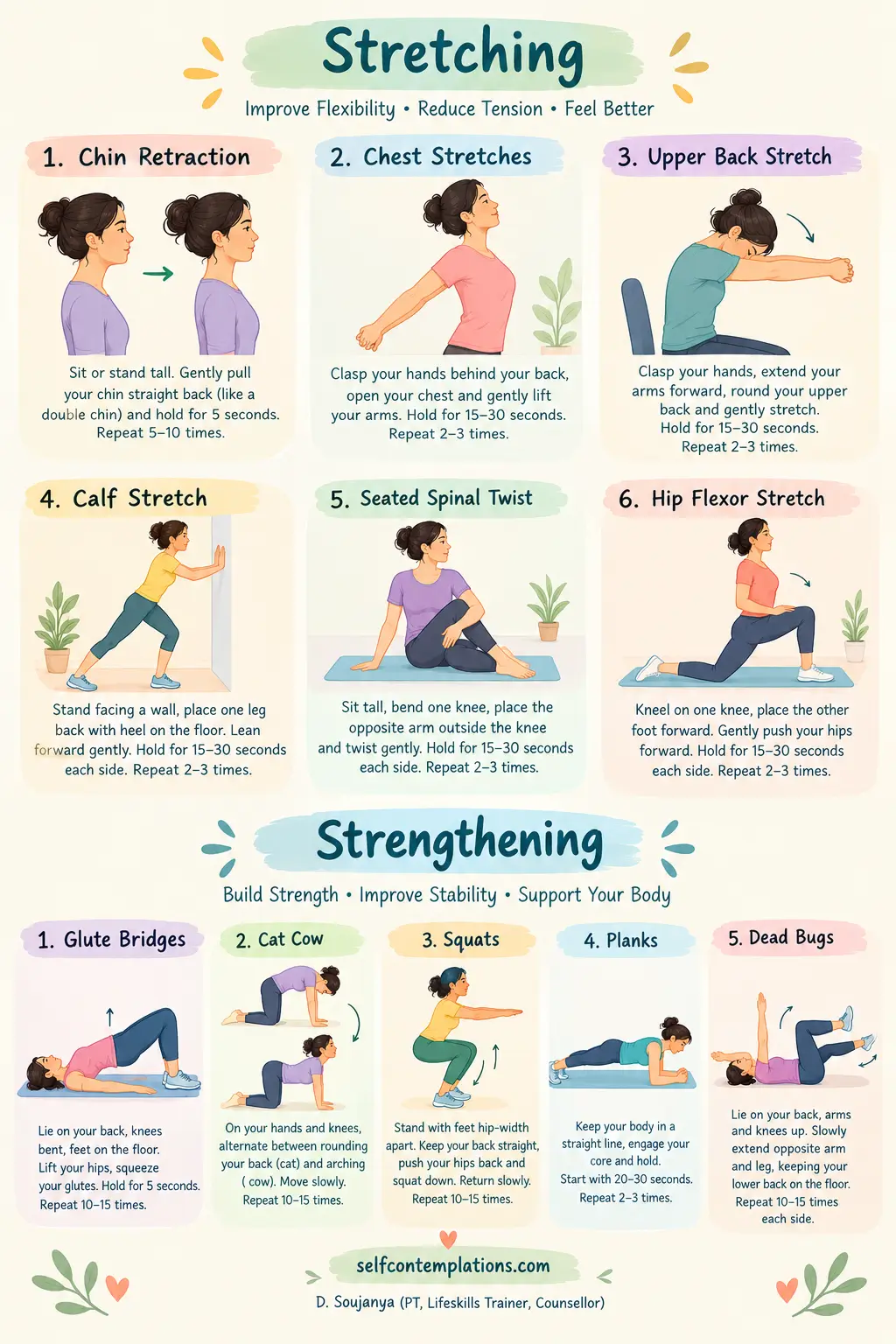
Stretching can be a simple way to introduce movement when your muscles feel stiff after prolonged sitting.
You could include a few gentle movements during your day, such as:
- Neck stretches: Slowly move your head from side to side within a comfortable range.
- Chin Retraction : Sit comfortably and look straight ahead. Gently draw your chin backward, as though you are creating a small double chin.
- Chest stretch: Use a doorway or simply bring your arms behind you to gently open the front of the chest.
- Upper-back stretch: Bring your arms forward and gently round your upper back.
- Hip flexor stretch: Step one foot forward and gently shift your weight forward.
- Calf stretch: Place one foot behind you and gently press the heel toward the floor.
- Seated Spinal Twist: Sit tall, twist to one side, and hold for 15–20 seconds to relieve tension in your back.
Stretching should feel comfortable rather than painful. Avoid bouncing or forcing your body into a deeper position.
5. Strengthen Your Core and Back
Mobility is only one part of taking care of your body. Strength is important too. Your core and back muscles contribute to your ability to maintain different positions and perform everyday movements.
Simple exercises that can be incorporated into a short home routine, including:
- Glute bridges
- Cat-Cow Stretch
- Dead bugs
- Squats
- Modified planks
You don’t need to spend an hour exercising. A short, consistent routine performed regularly can be more realistic and sustainable than occasional intense workouts. If you are new to exercise or have an existing injury, choose exercises appropriate for your individual situation.
6. Protect Your Wrists and Hands
Your hands and wrists may perform hundreds or thousands of small movements during a working day. Typing, clicking, scrolling, and using a mouse for prolonged periods can become uncomfortable, particularly when your workstation encourages awkward wrist positions.
Desk-related discomfort isn’t limited to the neck and back. Long periods of keyboard and mouse use can also contribute to wrist, hand, or forearm discomfort.
Try to:
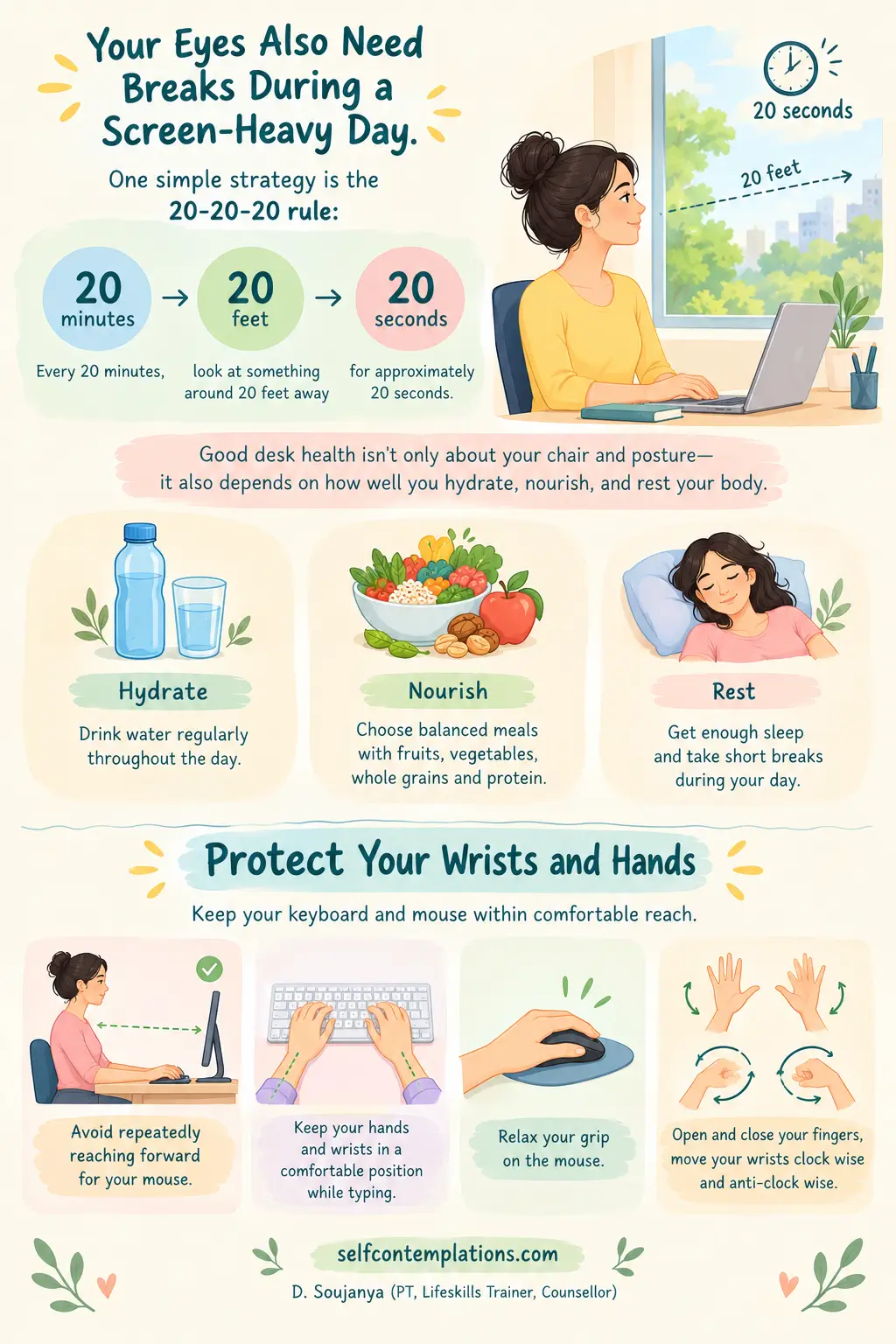
- Keep your keyboard and mouse within comfortable reach.
- Avoid repeatedly reaching forward for your mouse.
- Keep your hands and wrists in a comfortable position while typing.
- Relax your grip on the mouse.
- Open and close your fingers, move your wrists clock wise and anti-clock wise.
If you experience persistent pain, numbness, tingling, or weakness in your hand or arm, don’t simply assume that it is caused by your desk setup. A healthcare professional can help identify the underlying cause.
7. Follow the 20-20-20 Rule
Ergonomics isn’t only about your chair and posture. Your visual environment matters too. Poor lighting, screen glare, or an awkward monitor position can contribute to visual discomfort and may encourage you to lean closer to the screen. If you regularly find yourself moving your face closer to the screen, squinting, or developing headaches while working, your screen setup may need attention.
Your eyes also need breaks during a screen-heavy day. One simple strategy is the 20-20-20 rule:
Every 20 minutes, look at something around 20 feet away for approximately 20 seconds.
Remember that looking at your phone during every computer break doesn’t really give your eyes a break from screens. Whenever possible, allow some of your breaks to be completely screen-free.
Your breaks should also give your mind a chance to step away from constant notifications and screen switching. If you often find yourself jumping between emails, social media, messages, and work tasks, you may also want to read about How media multitasking hurts your focus, memory, and productivity
8. Stay Healthy
When you’re busy with work, it’s easy to overlook the basic habits that keep your body and mind functioning well.
Keep water nearby and make a habit of drinking throughout the day. Choose balanced meals and nourishing snacks to support steady energy rather than depending mainly on sugary foods and drinks.
Try to maintain regular sleep, even when your workload is demanding.
Good desk health isn’t only about your chair and posture—it also depends on how well you hydrate, nourish, and rest your body.
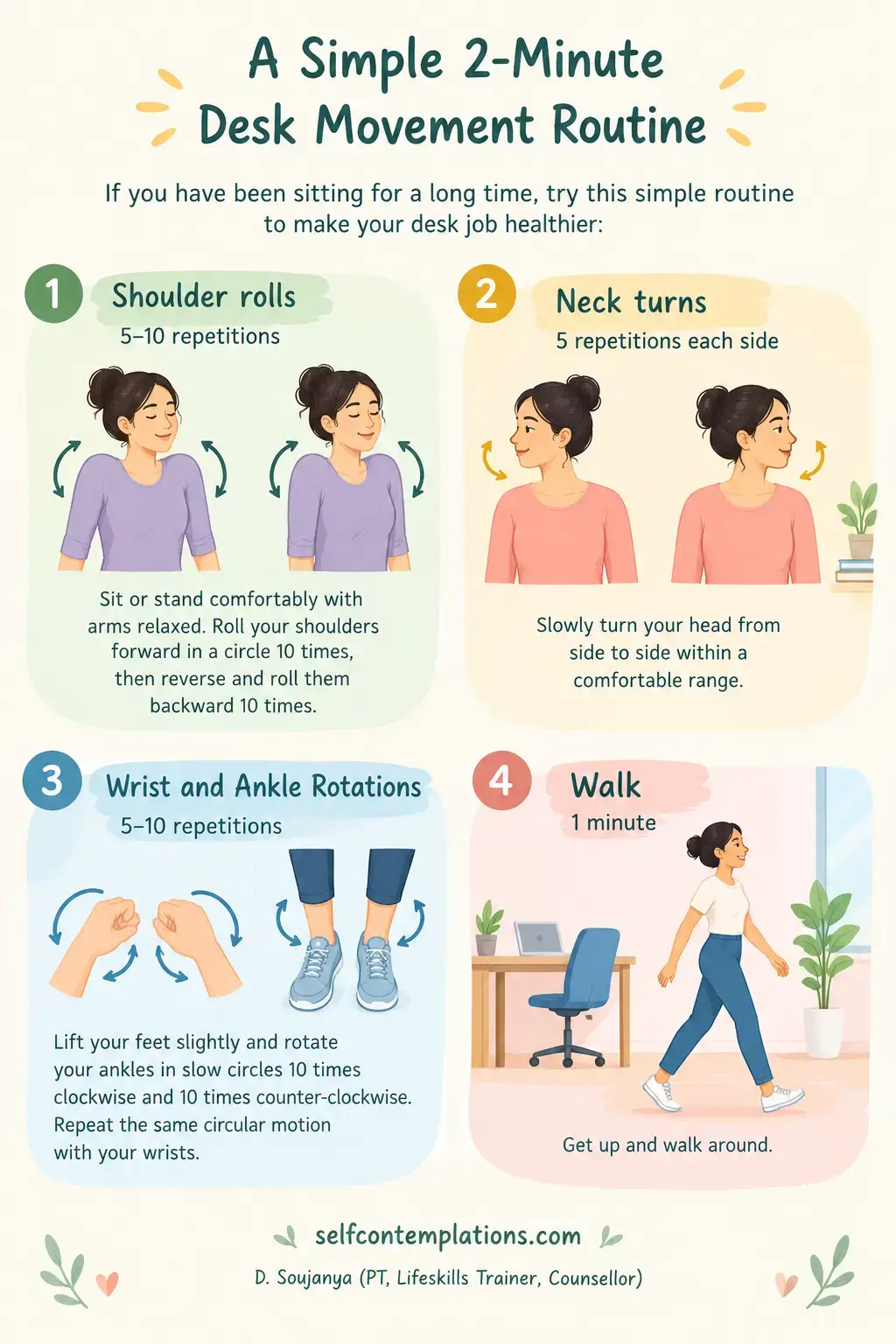
A Simple 2-Minute Desk Movement Routine
If you have been sitting for a long time, try this simple routine to make your desk job healthier:
1. Shoulder rolls – 5–10 repetitions: Sit or stand comfortably with arms relaxed. Roll your shoulders forward in a circle 10 times, then reverse and roll them backward 10 times.
2. Neck turns – 5 repetitions each side: Slowly turn your head from side to side within a comfortable range.
3. Wrist and Ankle Rotations– 5–10 repetitions: Lift your feet slightly and rotate your ankles in slow circles 10 times clockwise and 10 times counter-clockwise. Repeat the same circular motion with your wrists.
4. Walk – 1 minute: Get up and walk around.
When Should You See a Physiotherapist?
Occasional stiffness after a long day at your desk can happen. However, persistent, recurring, or worsening pain should not simply be ignored.
Consider consulting a physiotherapist or another appropriate healthcare professional if your symptoms:
- Keep returning
- Continue for several weeks
- Are getting progressively worse
- Interfere with work or everyday activities
- Affect your sleep
- Are associated with numbness or tingling
- Are associated with weakness
- Make normal movement increasingly difficult
A physiotherapist can assess your symptoms, movement, strength, mobility, and functional habits and help identify factors that may be contributing to your discomfort.
Your programme can then be tailored to your individual needs rather than relying on generic exercises.
Simple Desk Job Pain Prevention Checklist
Before starting your workday, ask yourself:
☐ Is my screen positioned comfortably?
☐ Are my feet supported?
☐ Are my shoulders relaxed?
☐ Can I work without repeatedly leaning toward my screen?
☐ Is my keyboard and mouse within comfortable reach?
☐ Have I planned regular movement breaks?
☐ Am I getting some physical activity during the day?
☐ Am I giving myself enough breaks from repetitive computer work?
You don’t have to change everything at once. Start with one or two changes and gradually build healthier desk movement habits into your working day.
Final Thoughts
Desk work is a normal part of modern life. You don’t need to worry about maintaining perfect posture every minute. Instead, focus on three simple principles:
Adjust your environment.
Change your position.
Move regularly.
A comfortable workstation, regular movement breaks, gentle exercises, and an active lifestyle can all contribute to better physical comfort during your working day.
If you are already experiencing persistent neck, shoulder, wrist, or back pain, don’t assume that changing your chair or posture alone will solve the problem. A physiotherapy assessment can help determine what may be contributing to your symptoms and whether specific exercises, movement strategies, or other treatment approaches may be appropriate for you.
Subscribe and Never Miss a Motivational Boost !!